Medical Document Anonymizer
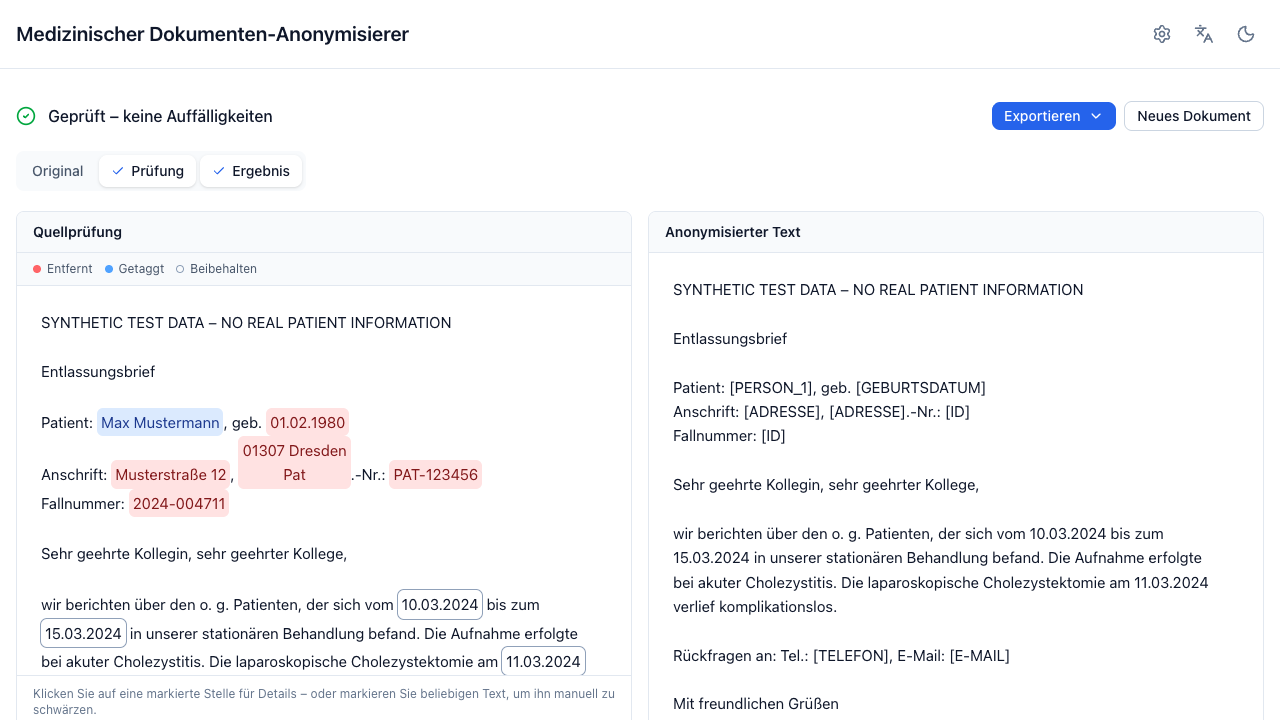
A locally deployable web app that anonymizes German clinical documents: drop a document (or paste text), press one button, get anonymized text out — with a review view showing exactly what was redacted and why.
This is an internal evaluation tool
Its output does not establish legal anonymization. Results must be reviewed by a human, and anonymization quality must be validated locally before any downstream use. The deploying institution remains the data controller.
How it works
No generative model ever rewrites the document. Detectors — rule-based
recognizers and a prompted LLM — only propose character spans. Deterministic
code applies the replacements on the immutable source text, and an independent
leakage-validation pass re-scans the output and reports
PASS / REVIEW_REQUIRED / FAIL.
Document → extraction → rule + LLM detection → span merging
        → deterministic transformation → leakage validation → review UI
What it gives you
- Paste, drop, or batch. Pasted text plus
.txt,.docxand.pdfuploads; several files at once, each processed independently. - Scanned PDFs. Detected automatically and routed to a configured OCR engine (docling-serve/Tesseract or a vision LLM).
- A reviewable result. Entities highlighted over the original text, each one clickable: preserve it, redact it, or correct its type. Every change re-runs the deterministic transformation server-side.
- Redacted PDF export. Native PDFs get true blackout at the character boxes; scanned PDFs are rebuilt from the anonymized text. Both fail closed — an export that cannot be verified is refused, except for a finding the anonymized text download carries too, which the reviewer may confirm.
- An evaluation harness for scoring the pipeline against annotated ground truth, reporting document-level leakage alongside the usual metrics.
Privacy defaults
- All processing happens in memory; nothing is persisted server-side.
- Logs never contain document content, enforced by a safe logger.
- No analytics, no third-party fonts, scripts, or CDNs, no telemetry.
- All model and OCR backends are configurable base URLs, local by default. The UI shows a banner whenever a configured endpoint is not local.
Citation
Cite the software itself with the metadata in
CITATION.cff.
The approach it builds on was introduced in the LLM-Anonymizer paper — cite that too when you refer to the method:
Wiest IC, Leßmann M-E, Wolf F, Ferber D, Van Treeck M, Zhu J, Ebert MP, Westphalen CB, Wermke M, Kather JN. Deidentifying Medical Documents with Local, Privacy-Preserving Large Language Models: The LLM-Anonymizer. NEJM AI 2025;2(4):AIdbp2400537. doi:10.1056/AIdbp2400537
This is a follow-up, not the paper's code
This repository is an independent reimplementation with a different architecture — it is not the artifact evaluated in that paper, and the accuracy reported there does not describe this tool. Measure it on your own documents with the evaluation harness.
Where to go next
- Getting started — install it and run your first document through it.
- User guide — the screens, the review workflow, and what each setting does.
- Operations — deployment, configuration, model and OCR endpoints.
- Security & governance — threat model, data flow, retention, DPIA template.
- Evaluation — measure how well it actually anonymizes your documents.
- Development — architecture, tests, and how to contribute.