Exporting
Exportieren always acts on the anonymized result — including every correction you made — regardless of which panels are visible.
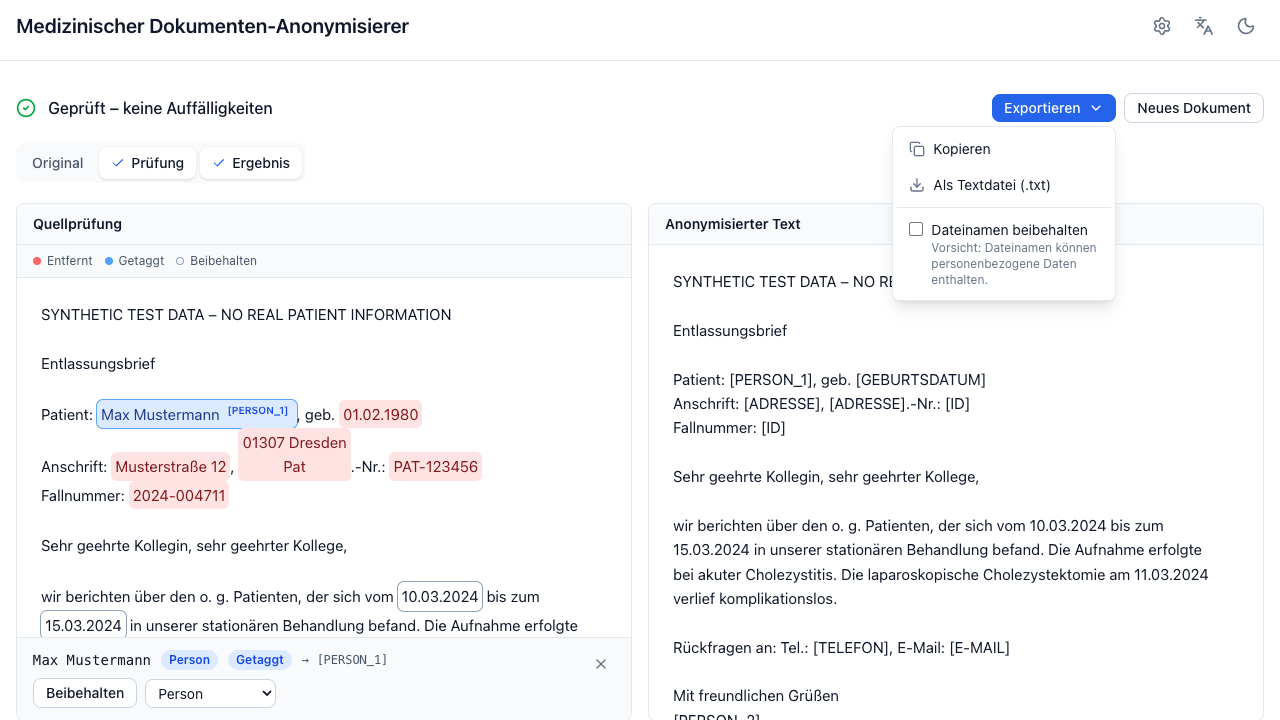
| Option | Available for | Produces |
|---|---|---|
| Kopieren | everything | The anonymized text on your clipboard. |
| Als Textdatei (.txt) | everything | anonymisiert.txt, UTF-8. |
| Als PDF | PDF uploads | A redacted PDF. |
| Alle Dokumente (.zip) | batches | Every finished document of the batch, in the format that fits each one. |
Redacted PDF
Two different paths, chosen by how the source was read:
Native PDF — the original file is redacted in place: the character boxes of every redacted passage are blacked out and the underlying text is removed, so the content cannot be recovered by copy-paste or text extraction. Layout, images, and formatting stay intact.
Scanned PDF (PDF (OCR)) — the original pixels are discarded and the
document is rebuilt from the anonymized text at the recognized line positions.
The result carries a "Maschinell rekonstruiertes und anonymisiertes Dokument"
notice. Layout is approximate. This is deliberate: an image cannot be verified
to be free of identifying pixels, so it is not shipped.
Both paths fail closed. If the redaction cannot be verified afterwards, the export is refused with an error rather than handing you a file that looks redacted but is not.
When the check finds text you kept
One finding is not a failure of the export, and it is the one you are most likely to meet: a redacted text that also occurs outside the redacted passages. Two everyday examples —
- the patient and the treating physician share a first name, and you kept the physician's;
- a phrase was redacted in one place and occurs again in a section where no detector found it.
Applying your decisions by position leaves that occurrence standing, so the PDF would show it — but so does the anonymized text you can already download, and the validation has flagged it there. Refusing the PDF would only make it stricter than the text.
So the export stops, names the passages that would stay visible, and offers Trotzdem exportieren. The Geschwärztes PDF panel then keeps a notice saying the document was exported despite an open finding, for as long as it is on screen. Confirm once per finding: adjusting other entities does not ask again, a new passage does.
This applies to reconstructed (scanned) PDFs. A native PDF removes every occurrence of a redacted text, so it does not run into it — see the warning below for what that costs instead.
Everything else stays refused with no way around it, because it means a blackout did not apply: a redacted text still in the PDF that the anonymized text does not contain, a passage the exporter could not locate on the page, or text surviving under an area you blacked out. Use the text export in that case, and report the document.
Black bars in a rebuilt document
The two paths look different by nature: a native PDF blacks its redactions out,
while a rebuilt one prints the replacements as words — [PERSON_1],
[ADRESSE]. Schwarze Balken statt Platzhaltern in the export menu (shown
for scanned sources only) draws a bar over each placeholder instead, so the two
kinds of document look alike.
The bar is painted over the placeholder, which stays in the text layer: copying
the text out still yields [PERSON_1], including which person the tag refers
to. Nothing sensitive sits under a bar — the original text was never written
into the rebuilt page in the first place.
Dates reduced to their year stay readable either way, exactly as in a native export. The setting is remembered, applies to the preview and to every document of the batch, and changes nothing about what was redacted — only how it is drawn.
Any areas you blacked out are applied on top, in both paths.
A native PDF redacts by text, not by position
The native path has no character offsets to work from — it finds each redacted passage by searching every page for that text. So if the same string occurs several times and you kept only one of them, that one stays blacked out in the PDF, even though the text export shows it. The app says so above the Geschwärztes PDF panel whenever it applies.
To make a passage visible in the PDF, keep every occurrence of it: select one, press Alle N Vorkommen wählen, then N beibehalten (Correcting several finds at once). Once no occurrence is redacted, there is nothing left for the export to search for.
Scanned PDFs are not affected — they are rebuilt line by line from the anonymized text, so a single kept occurrence comes through correctly.
The original file is re-sent
Nothing is stored on the server, so the browser uploads the original PDF again for the export. When it matches the document you just anonymized, the server reuses its cached detection — no second OCR or LLM run. After the cache expires the export takes as long as the original run.
Filenames
By default every export is named after the document's
output language
— anonymisiert.* for a German run, anonymized.*, anonymise.* or
anonimizado.* for the others — and the ZIP numbers its entries. The file
belongs to the document, so switching the interface language afterwards does
not rename it.
Dateinamen beibehalten in the export menu keeps the original filenames instead. Convenient for a large batch — and a real risk: filenames routinely contain patient names, birth dates, and case numbers, none of which the tool can redact. Turning it on means you take responsibility for the filenames.
After the export
The export is where the tool's job ends and yours begins:
- Read the output. Especially when the status was Prüfbedarf.
- Check the filename if you kept the original names.
- Remember what is preserved by policy — clinical dates by default, plus anything you chose to keep. Individually harmless, they can identify a person in combination.
- Nothing is logged or kept on the server. If you lose the file, the document has to be processed again.