Audit Logging & Central Error Log
LLMAIx Web records an append-only audit trail and a central error log to support the accountability requirements of a clinical deployment. This document explains what is recorded, how to read it, and how to operate it.
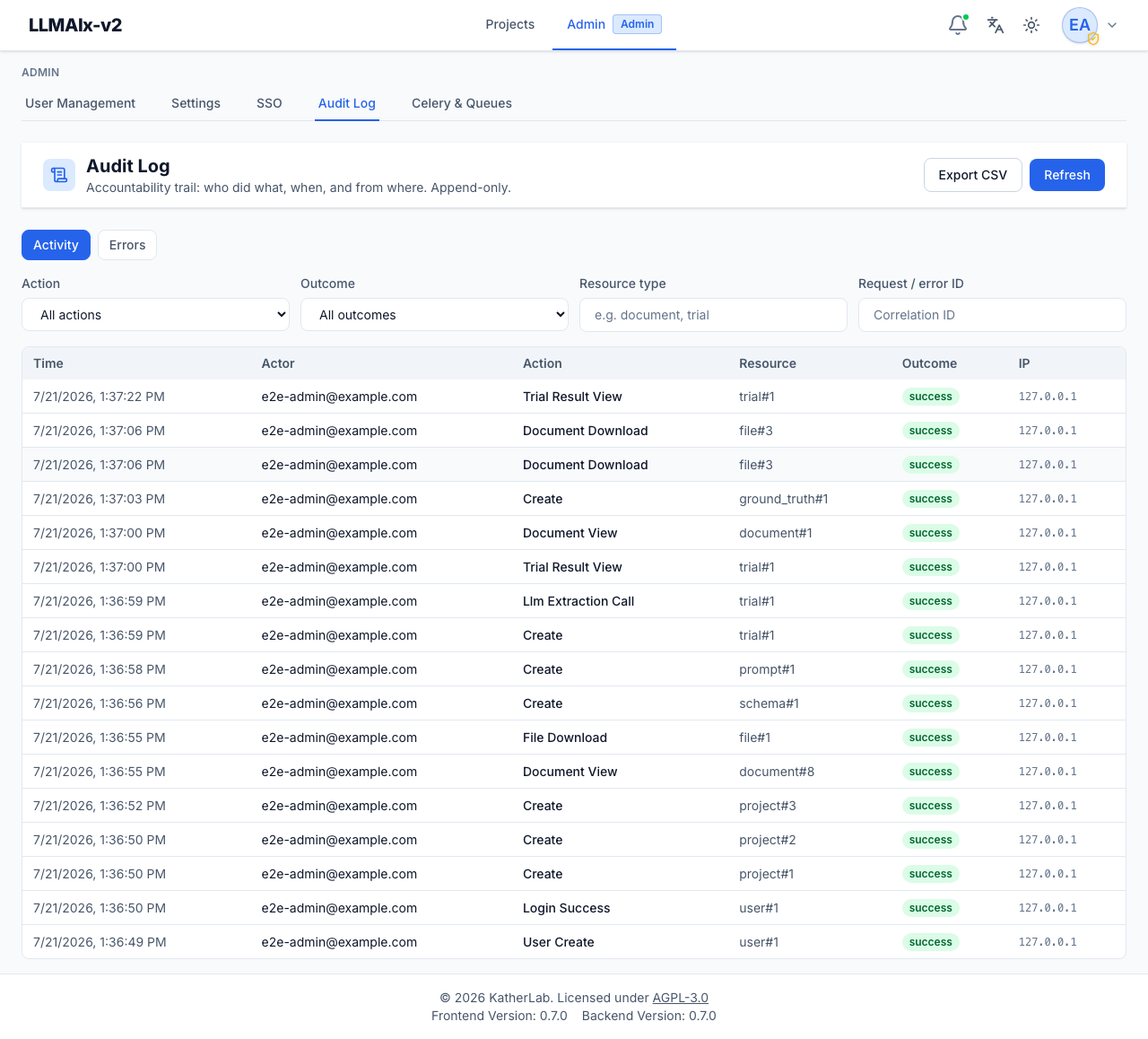
Admins read both from Admin → Audit Log:
What gets recorded
Audit trail (audit_logs)
Written by backend/src/utils/audit.py:record_audit at chokepoints across the
app. Each row captures who / what / when / from where and never contains
PHI (no document text or extracted values — only ids, counts, names, hosts).
Recorded actions (AuditAction in backend/src/utils/enums.py):
| Group | Actions |
|---|---|
| Authentication | login_success, login_failure, logout, token_refresh, account_locked, password_change, password_reset, sso_login |
| Authorization | access_denied — an authenticated user refused a project they aren't a member of (reason: not_project_member), a read-only collaborator attempting a change (reason: insufficient_project_permission), or a non-admin hitting an admin route |
| Access (PHI) | document_view, document_download, file_download, trial_result_view, export |
| Mutations | create, update, delete, cancel (discriminated by resource_type; includes self-service SSO identity link/unlink as user_identity) |
| Egress (PHI leaves) | llm_extraction_call, ocr_external_call — records endpoint host, model, document count |
| Sharing | project_share, project_share_update, project_unshare — records the target user id and the permission granted |
| Administration | setting_change, user_create (incl. the first-admin bootstrap, flagged first_admin: true), user_role_change, user_deactivate, invitation_send, sso_provider_change |
Each row: timestamp, actor (user id + email snapshot + IP), action, resource
type/id, project id, outcome (success/failure/denied), a small PHI-free
detail JSON, and the request correlation id.
The trail is append-only by construction: the service exposes only an insert path, there are no update/delete routes, and the admin API is read-only. Rows are written in an independent transaction so they survive a rollback of the business operation and never break a request if the audit write itself fails.
Denied-access rows are throttled. Nothing rate-limits a client that hammers
a forbidden endpoint, so identical denials (same actor, resource, method+path)
collapse into one row per 60 s per API worker. A persistent prober therefore
shows up as a steady trickle rather than one row per request — the burst is
still visible, but it cannot inflate a table that is deliberately hard to prune.
Each row's detail carries the attempted method and path, so you can see
what was probed, not only which resource was refused.
Error log (error_logs)
Every unhandled server error is caught by the global handler
(backend/src/middleware/error_handlers.py), which:
- assigns a short error id (the request correlation id),
- logs the full traceback under that id,
- writes an
error_logsrow (endpoint, exception type, message, traceback, actor), and - returns
{ "error_id": ..., "message": "… Quote this ID to your
   administrator …" }
to the client — no exception detail leaks.
The user sees the id in the error toast; an admin looks it up to see the trace.
How to read it (admins)
In the app: Admin → Audit Log.
- Activity tab: filter by action, outcome, resource type, or correlation id; click a row for full detail; Export CSV for the current filter.
- Errors tab: paste an error id a user reported to pull up the full traceback, or browse recent errors.
API (admin-only, read-only):
GET /api/v1/admin/audit— paginated, filterable (action,outcome,actor_user_id,resource_type,project_id,request_id,start,end).GET /api/v1/admin/audit/export— CSV stream of the filtered trail.GET /api/v1/admin/errors?error_id=<id>— look up one error, or list recent.
Correlation across logs
The same correlation id appears in (a) the app log line, (b) the audit row's
request_id, (c) the error log's error_id/request_id, and (d) the
X-Request-ID response header. Given one id you can pivot across all four.
Set LOG_FORMAT=json to emit structured logs (one object per line, including
request_id) for ingestion into a SIEM/Loki.
Operations
- Retention. The audit and error tables grow with use. Include them in your database backups. If you must prune, do so from the database side per your retention policy (see DATA_RETENTION.md); the application intentionally provides no delete path.
- Forwarding. For tamper-resistance beyond an in-database append-only table, ship the JSON logs (which include audit lines) to an external, write-once sink (syslog/SIEM). This is the recommended upgrade for higher-assurance settings.
- Volume.
document_viewis recorded on every single-document open; on a high-traffic deployment this is the highest-volume audit action. It is indexed by(project_id, created_at)and(actor_user_id, created_at)for efficient filtering.
What is intentionally not logged
- No PHI: document text, extracted field values, and ground-truth values are never written to the audit trail, error log, or application logs.
- Setting values are not audited (only the keys that changed), since some settings are security-relevant.