Evaluation
An evaluation compares a completed extraction run's results against ground truth and computes accuracy metrics. This is how you measure and debug extraction quality.
Creating an evaluation
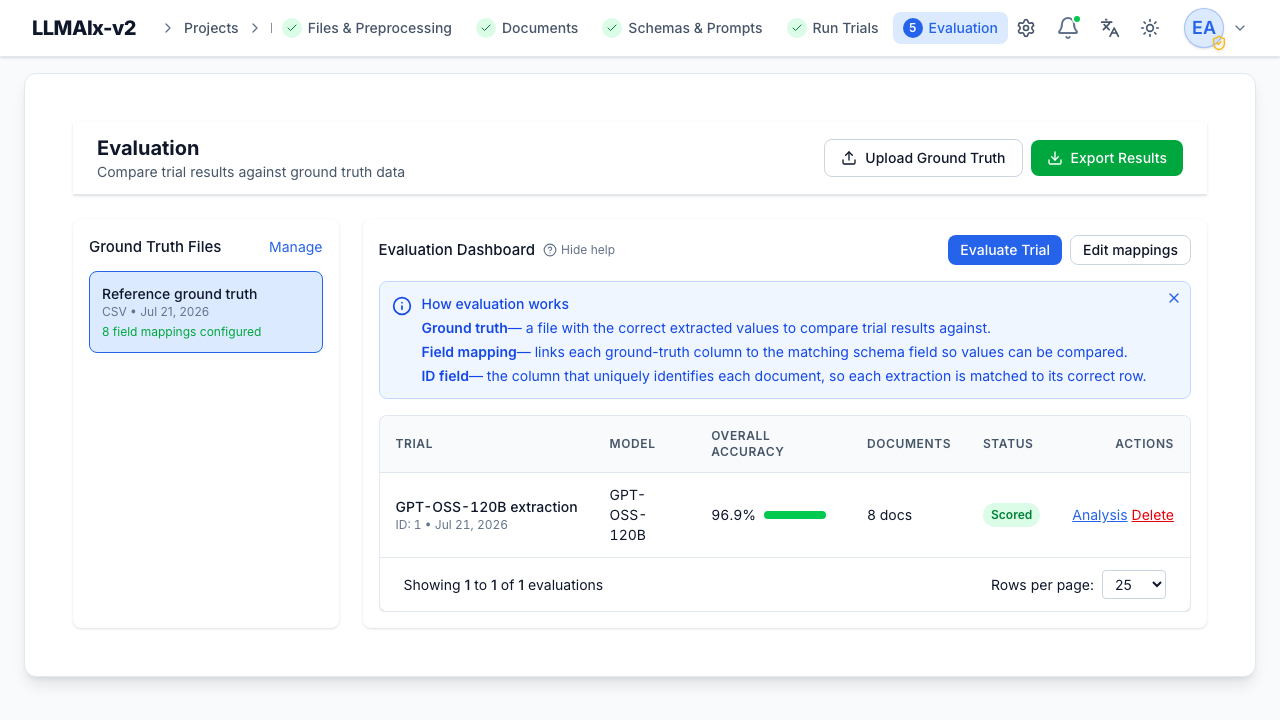
An evaluation is the combination of an extraction run + a ground-truth file + field mappings. From the Evaluation dashboard:
- Select a ground-truth file that has field mappings configured.
- Click Evaluate Extraction Run and pick a completed run from the list.
Runs without mappings for their schema (or with no results) are greyed out. Already-evaluated runs are marked, and re-evaluating asks for confirmation.
Only matched documents are scored
Documents whose identifier can't be matched to a ground-truth entry are reported separately and excluded from the accuracy figure. If a run has a low match rate you'll get a warning listing the unmatched documents. A match rate below 80% (or below 50%) is surfaced as a warning, but evaluation still runs on the documents that did match.
Evaluations are auto-invalidated and recomputed when their inputs change — editing the ground-truth file, its ID column, or the field mappings, or re-running the extraction. A cached evaluation is reused only while the run's results haven't changed since it was computed.
The evaluations table
Each row shows the extraction run, model, overall accuracy (with a colored bar: green ≥90%, yellow 50–90%, red <50%), the document count (and how many matched, with an unmatched-count tooltip when some are excluded), and a status (Scored or Has Errors). Rows have Analysis and Delete.
The "How evaluation works" callout stays visible until mappings exist, to guide first-time setup.
Note
Deleting an evaluation keeps the extraction run and ground truth — you can re-evaluate anytime.
Metrics explained
- Accuracy = correct fields ÷ total fields, over matched documents only.
- Precision / Recall / F1 are computed from per-field outcomes:
- A correct field is a true positive.
- A missing field (ground truth present, prediction absent) counts as a false negative.
- An extra field (prediction present, ground truth absent) counts as a false positive.
- A wrong value (a substitution — the model produced a value where the ground truth also had one, but it was wrong) counts as both a false positive and a false negative.
Why a wrong value hurts twice
Counting a substitution as both FP and FN is the standard information- extraction (MUC) convention. It means a set of fully-wrong-but-present values does not score 100% recall. Every mismatch, type error, or unparseable date is treated as a substitution.
Precision, recall, and F1 are reported both overall and per field, so a field can look accurate yet still show a recall dent if the model tends to skip it.
Analysis page
Analysis opens a detailed view.
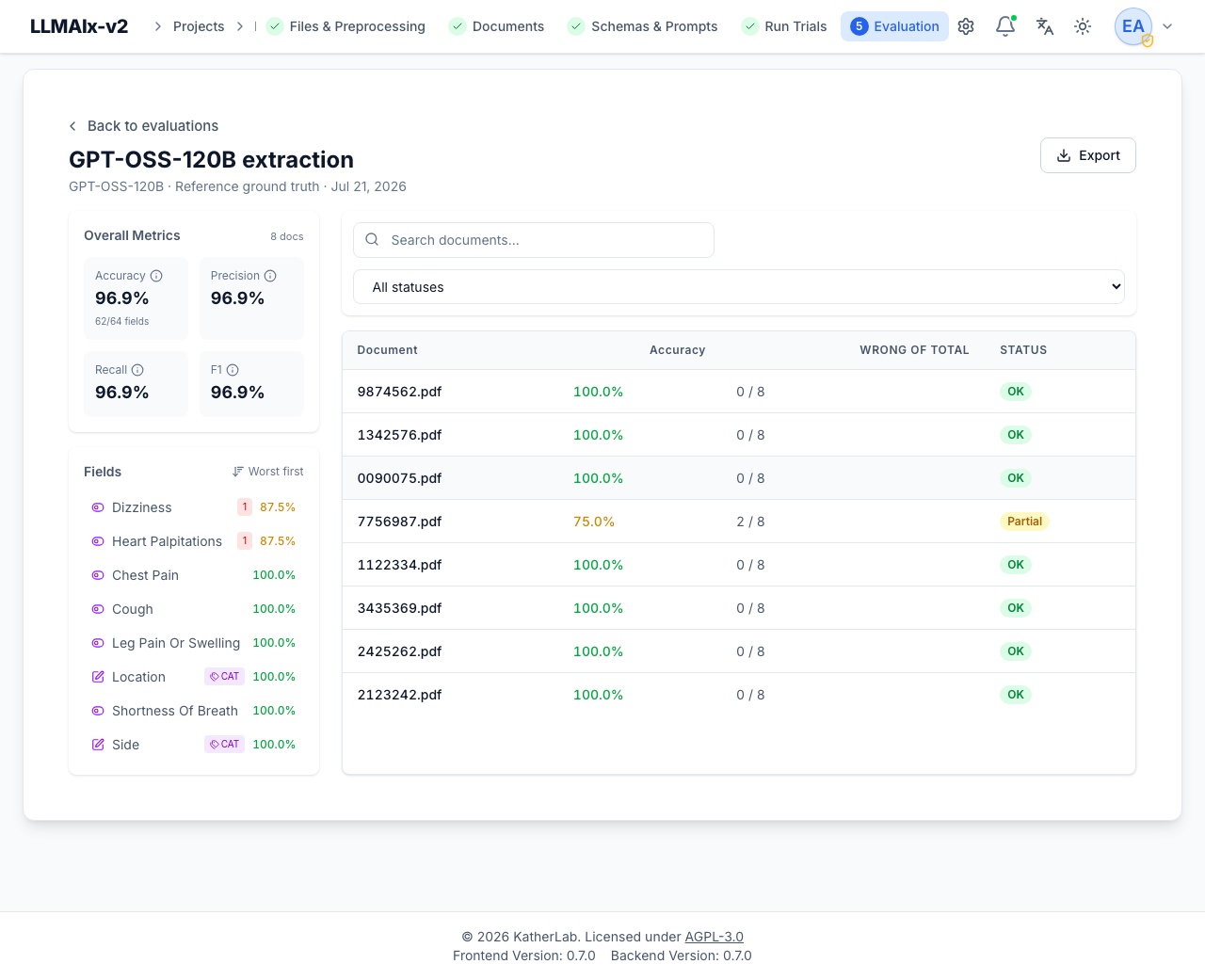
- Overall metrics cards (accuracy, precision, recall, F1), with a note on how many fields/documents were matched vs. excluded.
- Fields list — sortable Worst first (default, to surface problem fields) or A→Z, each with its accuracy and error count. Categorical/boolean fields carry a CAT badge. Click a field to filter the document table to it and (for categorical fields) show its confusion matrix.
- Filter bar — search documents and filter by status: All, Failed (didn't score), Has wrong values, Has missing fields, High ≥90%, Low <50%.
- Confusion matrix (categorical/boolean fields) — expected rows × predicted columns; click a cell to filter the document table to that expected→predicted case. A confusion matrix is only built for discrete-valued fields (mapped as category or boolean), never for free text.
- Document table — per-document accuracy, wrong/total counts, and a status tier — OK (≥90%), Partial (50–90%), Low (<50%), or Error (a document that couldn't be scored). Click a row for the failure detail.
Per-document failure detail
The failure drawer shows, for one document, up to three panels (navigate with ←/→ or J/K, close with Esc):
- Source — the original file or extracted text.
- Comparison — a field-by-field Expected vs. Predicted table with the error type, a suggestion, and the comparison-method chip (plus threshold/tolerance) that judged the field.
- Output — the raw structured result.
- Reasoning — the model's reasoning, when present.
Exporting
Export Results (or Export from the analysis page) opens the export dialog.
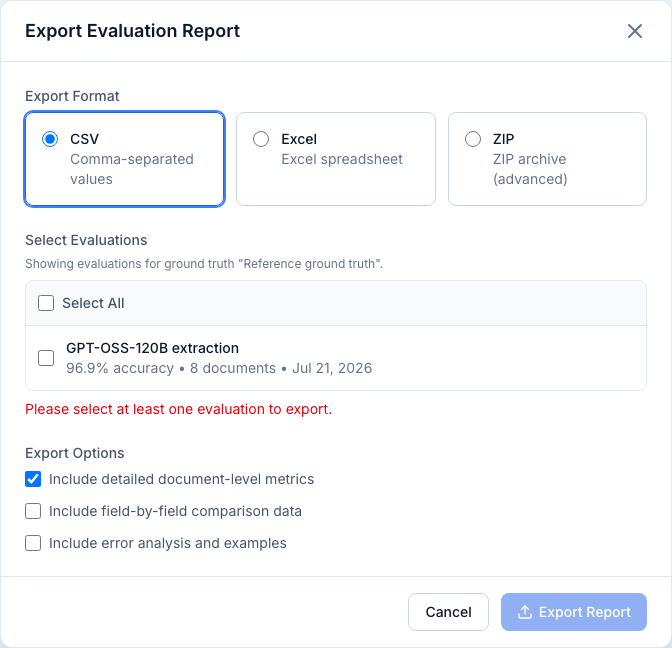
- Format — CSV, Excel (xlsx), or ZIP (advanced).
- Select Evaluations — one or more (the evaluation you launched from is pre-selected); a Select all toggle and a per-file scoping note are shown.
- Options:
- Document-level metrics (on by default) — one row per document.
- Field-by-field data — the expected/predicted detail for every field.
- Error analysis — the breakdown of error types.
- ZIP only: include document content and/or ground-truth content in the archive.
A live preview summarizes how many evaluations and documents the export will contain. A ZIP that bundles document or ground-truth content can be large, and a warning appears when either is selected (no fake size estimate is shown, since the real size depends on content the browser can't measure).
Clinical data exports are audited
Exports of clinical data are recorded in the audit log.